

Formula Control Scale
Formula Control Scale – Absolute Control
This topic is part of the SG Systems Global regulatory & operations glossary.
Updated November 2025 • formula control scale, formulation scale, controlled recipe weighing, tolerance enforcement, barcode identity, calibration status, eBMR, data integrity • Food, Dietary Supplements, Pharma, Cosmetics, Chemicals, Meat & Sausage, Bakery
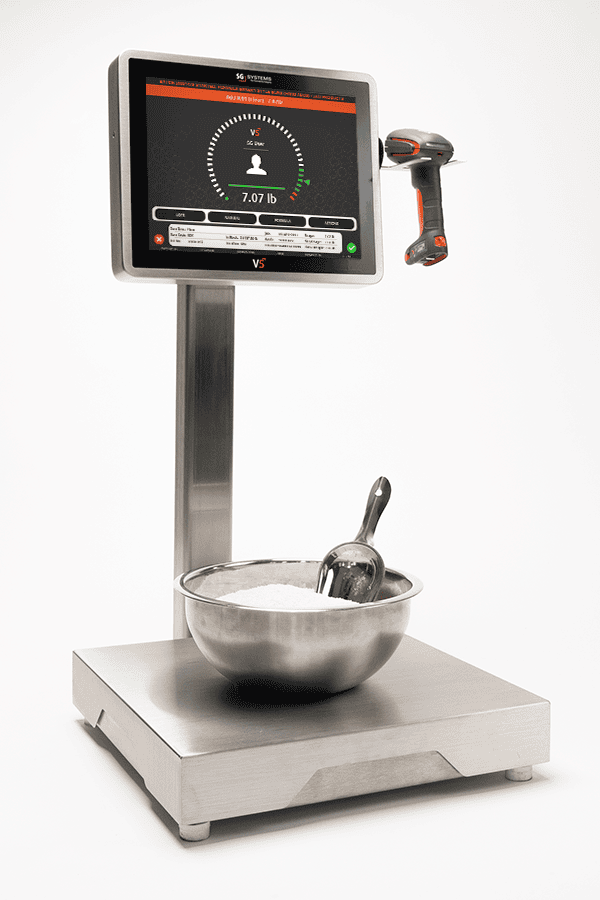
A properly integrated Formula Control Scale is more than a weighing device. It is a controlled formulation workstation that enforces the right material, right lot, right target, right tolerance, right user, right time—every time you weigh. It connects the physical scale to recipe logic, barcode validation, calibration status and audit trails, generating records that stand up to 21 CFR Part 11, Part 111, Part 117, Part 211, ISO 22716 and EU Annex 11. A “dumb” bench scale with a notepad is not a control point; it is a risk.
“If your scale doesn’t know which formula, which ingredient, which lot, which tolerance and which user it’s serving, it’s not a Formula Control Scale. It’s just a number generator.”
TL;DR: A Formula Control Scale combines a calibrated weighing device with recipe-aware software. It pulls in the correct formula from MES/ERP, locks material identity via barcode/GS1-128, enforces per-ingredient tolerances, captures who/what/when/which scale, prevents use of out-of-calibration instruments, and feeds clean data into BMR/eBMR, WMS and MES. It turns each weigh into a controlled GMP event, not a guess.
1) Why a Formula Control Scale now—hard truths
- Weighing is where most recipes go off script. Substituted ingredients, “close enough” weights and undocumented re-weighs quietly undermine quality and label claims.
- Tolerances are rarely uniform. A ±5% rule is reckless for APIs, enzymes, nitrite, preservatives and potent flavors. A Formula Control Scale enforces per-ingredient, asymmetric tolerances with hard stops.
- Data integrity gaps often start at the scale. Shared logins, handwritten tickets and manual transcription from displays to paper are still top inspection findings.
- Calibration status is ignored when production is under pressure. Operators will use any “working” scale if the system doesn’t block it.
- Traceability depends on the weigh point. If you cannot prove which lot and weight actually went into a batch, your entire genealogy is compromised.
2) Scope of a Formula Control Scale
| Area | What it controls | Glossary anchors |
|---|---|---|
| Formula Selection | Which product, strength, batch and step are active on the scale | Products & Formulas, BOM |
| Material Identity | Barcode/GS1-128 scans for item, lot, expiry, status | Barcode Validation, GS1-128 |
| Tolerance Enforcement | Per-ingredient targets, asymmetric tolerances, over/under logic | Control Limits, CPPs |
| Scale Asset Control | Scale ID, location, capacity, calibration & verification status | Calibration Status, IQ/OQ/PQ |
| Weighing Workflow | Order-of-addition, tare, stability, unit switching, prompts | SOP, Weigh & Dispense Automation |
| Allergen & Hygiene | Zoning, changeover prompts, cleaning checks before first weigh | Allergen Control, Raw vs RTE Zoning |
| Rework & Potency | Rework lots, potency factors, corrected target charges | Rework Traceability, Potency Adjustment Factor |
| Label & Container IDs | Tub/bin labels with job, lot, weight, allergen state | Labeling Control |
| Data Integrity | Unique users, e-signatures, time sync, immutable audit trails | Part 11, Audit Trail |
| Batch Records & Traceability | Structured records for BMR/eBMR, links to genealogy | BMR, eBMR, Lot Traceability |
| Integrations | Formula, lot & consumption sync with MES/WMS/ERP/LIMS | MES, WMS, LIMS |
3) Formula governance—your scale should never guess the target
A Formula Control Scale only earns its name if it is reading from a controlled formula library, not handwritten sheets. BOMs and formulations sit under Document Control with clear versioning, alternates and effectivity dates. The scale session pulls the exact target, units and tolerance band per ingredient from that master—no manual keying. For high-potency or potency-variable materials, the system applies Potency Adjustment Factors and shows operators both the label dose and adjusted charge.
4) Allocation & identity—scan first, weigh second
Workflows start with a job or batch ID. A pick-list from WMS/ERP defines which lots to use; the Formula Control Scale enforces that plan via scanning. Operators must scan the material label—often GS1-128—so the software can confirm item, lot, expiry, QA status and allergen state before weighing is unlocked. If the wrong lot, expired, or quarantined material is presented, the step blocks and QA gets an alert rather than a surprise in the deviation log.
5) Weighing execution—tolerances, tare and stability under system control
- Tare and net enforcement. The scale requires tare capture (empty container) and stable gross readings before calculating and storing net weight. Net values are calculated and logged by the system, not by operators on calculators.
- Per-ingredient tolerances. Each component has its own target and tolerance: e.g., +0%/−1% for nitrite, ±0.5% for enzymes, ±2% for salt or bulks. Attempts to accept out-of-tolerance nets are blocked or forced into an exception path requiring QA e-signature.
- Order-of-addition logic. Steps appear in the correct sequence for the formula; you cannot “jump ahead” or revisit a completed weigh without a documented adjustment.
- Unit and resolution control. The system switches units (kg, g, mg) and scale ranges automatically for micro-weigh steps, preventing coarse scales from being used for fine work.
- Real-time feedback. Approaching/within tolerance is shown clearly; operators are guided toward the target (e.g., “approach from below”) to avoid habitual overshoot.
6) Scales & calibration—Formula Control Scale as a qualified asset
Each Formula Control Scale is registered as an asset with unique ID, capacity and location. The control software checks calibration status, routine verification (check weights) and IQ/OQ/PQ status before allowing use. If calibration is due or a verification fails, weighing is blocked and an event is logged. That way, “we were busy” is never an excuse for using an out-of-tolerance scale on a GMP batch.
7) Allergens & hygiene—zoning on the scale as well as on the floor
Formula Control Scales live inside allergen and hygiene zoning rules. The system knows whether the active job is allergen-free, contains particular priority allergens, or is high-risk (infant, medical, free-from). It requires completion of Allergen Changeover Verification steps—checklists, swabs, cleaning lot scans—before the first allergen-sensitive weigh is allowed. Zones (raw vs RTE, nut vs non-nut) are enforced by restricting which jobs can run on which scale stations in which sequence.
8) Labels & container control—what leaves the scale is fully identified
Every tub, bin or bag leaving the Formula Control Scale should be labelled by the system, not by hand. Labels include item, description, lot, net weight, timestamp, operator, destination step and allergen state. Where GS1 is supported, a GS1-128 or internal barcode is printed so downstream mixers, reactors or kettles can scan the exact sub-lot at the point of use. That closes the loop between formulation weighing and process genealogy.
9) Catch-weight, potency & rework—Formula Control Scale as the place where you record reality
For variable-weight inputs and potency-driven components, the Formula Control Scale is where the math becomes official:
- Catch-weight packs. Actual weight of each opened pack is captured, and the system subtracts what is weighed into the batch to track remainder accurately.
- Potency adjustments. For APIs, actives or concentrates, the scale applies potency adjustment factors based on COA data to calculate the correct gross addition.
- Rework lots. Rework is weighed, given a unique lot, and consumed against explicit formula limits; the system enforces caps and logs usage for genealogy and yield analysis.
10) Data integrity & compliance—no more anonymous weighs
The Formula Control Scale is a GMP data source, so it must respect data integrity expectations:
- Unique user accounts. Operators sign in with personal credentials; no shared “scale” login.
- E-signatures & meaning. Critical steps (e.g., weigh acceptance, tolerance override, changeover verification) require e-signatures with defined meaning under Part 11.
- Audit trails. All changes—weight edits, overrides, re-weighs, label reprints—are recorded in an audit trail with who/what/when/why.
- Clock synchronisation. Scale terminals share a timebase with MES, LIMS and WMS so event sequences are trustworthy.
11) Batch review, eBMR & release—Formula Control Scale as first chapter of the story
When QA opens a batch record, they should see an entire “weighing chapter” sourced from Formula Control Scales: which formulas, which operators, which lots, which nets, which tolerances, which scale IDs, which exceptions. That data rolls directly into BMR/eBMR, where Batch Review by Exception focuses QA on any out-of-tolerance nets, overrides or identity mismatches.
12) Implementation playbook—adding Formula Control Scales without stopping production
- Clean up formula and material masters. Align product codes, BOMs, unit-of-measure, densities, allergens and potency factors under Document Control.
- Register and qualify scales. Inventory all scales, map to locations, define capacities and tolerances; establish a calibration and daily-check program.
- Start with one scale per area. Pilot Formula Control Scale logic at a key workstation (e.g., high-risk room, API weigh booth, allergen room), refine workflows and then roll out.
- Wire identity and allergens. Introduce barcode scanning and allergen changeover checklists at the scale before expanding to more advanced features.
- Integrate with MES/WMS/ERP. Once patterns are stable, connect formula, lot and consumption data bi-directionally with your core systems.
13) How people search for this (and what we cover)
Teams typically search for formula control scale, formulation scale, recipe scale with barcode, GMP weighing scale, tolerance-controlled scale, Part 11 scale, MES-connected scale, and weigh & dispense scale. This page covers how a Formula Control Scale turns a regular bench scale into a controlled GMP workstation tied to your formulas, lots and batch records.
14) How this maps to V5 by SG Systems Global
V5 Formula Control Scales combine industrial weighing hardware with the V5 execution platform:
- With V5 MES. Each Formula Control Scale runs V5’s weigh & dispense workflows, pulling formulas from V5 MES and returning actuals into the eBMR and genealogy model.
- With V5 WMS. Material allocation, FEFO and lot statuses come from V5 WMS; consumption posts back for real-time inventory and traceability.
- With V5 QMS. Overrides, deviations and calibration events route into V5 QMS for investigation and CAPA.
- With V5 Connect API. ERP, LIMS and label systems talk to Formula Control Scales through the V5 Connect API, so weights and lots are consistent everywhere.
See the full context in the V5 solution overview.
15) KPIs that prove Formula Control Scales are doing their job
- Identity compliance: % of weigh steps with valid barcode scan before weighing (target 100%).
- Calibration compliance: % of weigh steps executed on in-calibration, verified scales (target 100%).
- Tolerance exceptions per batch: number and severity of out-of-tolerance nets requiring QA approval.
- Right-first-time weigh rate: % of weigh steps accepted without re-weigh or adjustment.
- Manual transcription incidents: count of errors traced to manual copying from the scale display (target trending to zero).
- Allergen changeover completion: % of allergen-sensitive runs with completed, on-time changeover verification at the scale.
16) Common pitfalls
- Keeping the scale “dumb.” Using MES and WMS but leaving scales as standalone devices, forcing manual data handling.
- One tolerance fits all. Applying the same over/under band to every ingredient regardless of potency or risk.
- Ignoring scale qualification. Treating calibration stickers as decoration instead of gating usage.
- Shadow spreadsheets at the bench. Allowing operators to maintain personal formula sheets or shortcuts instead of enforcing a single master.
- Weak user controls. Shared or generic logins that make it impossible to know who performed critical weighs.
17) Quick-start checklist
- Define which formulas and lines need Formula Control Scales first (highest risk, highest value).
- Register scales as assets; implement calibration and daily-check routines with electronic records.
- Introduce barcode scanning at the scale for materials and jobs; block weighing when scans fail.
- Configure per-ingredient tolerances and micro-weigh workflows; test on a pilot recipe.
- Integrate the pilot scale with MES/WMS; run a mock batch, QA review and traceability drill before expanding.
18) Extended FAQ
Q1. How is a Formula Control Scale different from a normal industrial scale?
A normal scale displays weight. A Formula Control Scale understands formulas, lots, tolerances, users, calibration and genealogy. It enforces the correct process rather than just reporting numbers.
Q2. Can we retrofit existing scales into Formula Control Scales?
Often yes—if they have suitable communication interfaces and meet capacity/resolution requirements. The software layer adds recipe logic, identity checks and audit trails on top of the hardware.
Q3. Do Formula Control Scales replace our MES?
No. They are workstations within the broader MES landscape, focused on weighing and formulation. They should be tightly integrated so that MES remains the single source of truth for execution and genealogy.
Q4. How many Formula Control Scales do we need?
Start with scales in high-risk areas: API or high-potency booths, allergen rooms, central weigh & dispense, or flagship lines. You can expand once patterns are proven.
Q5. Can a Formula Control Scale handle liquids and gases?
Yes. With the right load cells and integration, it can control and record mass-based additions from tanks or cylinders, including density and temperature compensation where required.
Q6. How does a Formula Control Scale contribute to traceability?
By linking each weighed quantity to a specific formula, step, lot and user, and by passing that data into MES/WMS genealogy. It closes the gap between planned consumption and what was really weighed.
Q7. What validation is needed?
The combination of hardware and software must be validated under your Validation Master Plan, including IQ/OQ/PQ of scales and CSV of the application and integrations.
Q8. What’s the minimum viable Formula Control Scale setup?
At minimum: a calibrated scale asset, barcode scanner, controlled formula download, per-ingredient tolerances, identity gates, unique user logins, basic audit trails and integration to your batch record.
Related Reading
• Foundations: MES | QMS | WMS | BMR | eBMR
• Controls: Part 11 | Annex 11 | Audit Trail | Calibration Status
• Materials & Identity: Barcode Validation | GS1-128 | Allergen Control | Traceability
• V5 Products: Solution Overview | V5 MES | V5 QMS | V5 WMS | V5 Connect API
OUR SOLUTIONS
Three Systems. One Seamless Experience.
Explore how V5 MES, QMS, and WMS work together to digitize production, automate compliance, and track inventory — all without the paperwork.

Manufacturing Execution System (MES)
Control every batch, every step.
Direct every batch, blend, and product with live workflows, spec enforcement, deviation tracking, and batch review—no clipboards needed.
- Faster batch cycles
- Error-proof production
- Full electronic traceability

Quality Management System (QMS)
Enforce quality, not paperwork.
Capture every SOP, check, and audit with real-time compliance, deviation control, CAPA workflows, and digital signatures—no binders needed.
- 100% paperless compliance
- Instant deviation alerts
- Audit-ready, always

Warehouse Management System (WMS)
Inventory you can trust.
Track every bag, batch, and pallet with live inventory, allergen segregation, expiry control, and automated labeling—no spreadsheets.
- Full lot and expiry traceability
- FEFO/FIFO enforced
- Real-time stock accuracy
You're in great company

















How can we help you today?
We’re ready when you are.
Choose your path below — whether you're looking for a free trial, a live demo, or a customized setup, our team will guide you through every step.
Let’s get started — fill out the quick form below.