V5 + QuickBooks Integration: Seamless Accounting for Regulated Manufacturers
Integrating V5 Traceability with QuickBooks connects commercial and accounting activity with plant-floor execution, giving manufacturers a practical way to keep orders, inventory, production, traceability, and finance aligned. QuickBooks handles customers, suppliers, purchasing, sales, and accounting. V5 handles receiving, production, lot traceability, inventory movement, quality workflows, and shipping. Together, they reduce duplicate data entry, improve visibility, and help ensure that financial records reflect what actually happened on the shop floor.
SG Systems supports both QuickBooks Online and QuickBooks Desktop. The business data exchanged between QuickBooks and V5 is fundamentally the same in both cases. What changes is the connection method. QuickBooks Online uses the QuickBooks API, while QuickBooks Desktop uses shared folders and structured file exchange. For the customer, the outcome is the same: QuickBooks remains the commercial system of record, V5 remains the operational system of record, and the integration keeps both synchronized without manual rekeying.
“Whether a manufacturer runs QuickBooks Online or QuickBooks Desktop, the objective is the same: keep commercial records in QuickBooks, manage execution in V5, and let the integration handle the movement of data between them.”
Two QuickBooks Options, One Integration Strategy
Many manufacturers already rely on QuickBooks as their accounting and commercial backbone. That does not need to change when V5 is introduced. QuickBooks still owns the customer records, supplier records, commercial item data, purchasing transactions, and sales demand. V5 extends that foundation into the plant by managing the operational detail that accounting systems are not designed to control in sufficient depth for regulated manufacturing.
This is the key point. V5 does not replace QuickBooks. It completes it. QuickBooks starts the commercial transaction. V5 manages the physical and procedural transaction. When materials are received, consumed, produced, checked, labeled, moved, and shipped in V5, the relevant business outcomes can be synchronized back to QuickBooks so finance and operations remain aligned.
That shared operating model works for both QuickBooks Online and QuickBooks Desktop. The difference is technical rather than functional. In other words, the same business flow can be shown in one generic diagram because the commercial data objects and operational transactions do not materially change between QBO and QBD.
How QuickBooks and V5 Work Together
QuickBooks remains the commercial system of record for customers, suppliers, items, purchase orders, and sales orders. V5 remains the execution system of record for receiving, production, lot traceability, inventory movements, quality checks, and shipping. The integration layer keeps both sides aligned without duplicate entry.
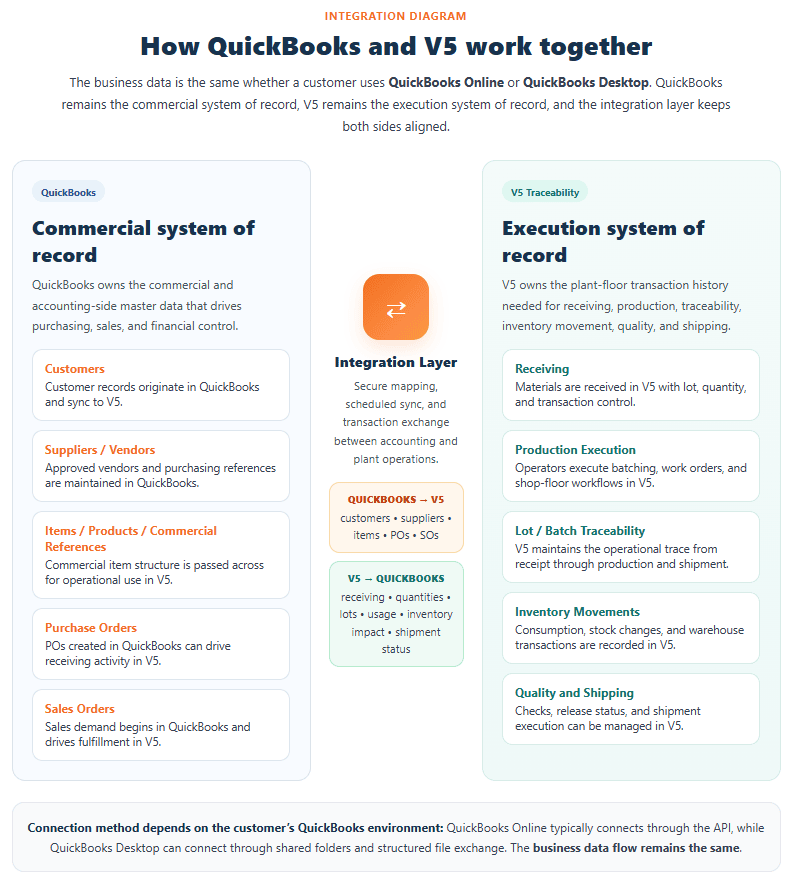
Because the underlying business data is the same, the diagram stays intentionally generic. It shows QuickBooks on one side, V5 Traceability on the other, and an integration layer in the middle. That makes it accurate for both deployment options. The article can then explain the difference clearly: QuickBooks Online typically connects through the API, while QuickBooks Desktop uses shared folders and file-based exchange.
What QuickBooks Sends to V5
QuickBooks typically initiates the commercial side of the process. Customer records, suppliers or vendors, item masters, purchase orders, and sales orders can be made available to V5 so plant teams are working from the same commercial foundation as the finance team. This avoids duplicate setup and helps prevent mismatches between what the office believes should happen and what the plant is actually being asked to do.
Purchase orders created in QuickBooks can drive receiving in V5. Sales orders captured in QuickBooks can drive fulfillment and shipment workflows in V5. Commercial item data can also be passed to V5 so production and warehouse teams can use the correct products, materials, and references during execution. In regulated environments, this matters because operators need more than accounting descriptions. They need workflow guidance, barcode activity, lot capture, traceability structure, quality prompts, and transaction history.
What V5 Sends Back to QuickBooks
Once work begins on the plant floor, V5 captures the operational detail that QuickBooks alone does not provide. That can include receiving quantities, lots, consumption, finished goods activity, stock movement, shipment confirmation, and related inventory impact. This allows QuickBooks to reflect what actually happened rather than relying on delayed spreadsheets, handwritten notes, or manual reconciliations after the fact.
For many manufacturers, this is where the real value becomes visible. Finance does not need to guess what was received, consumed, or shipped. Production does not need to maintain separate records just to satisfy accounting. Warehouse teams do not need to enter the same activity into multiple systems. V5 records the plant transaction once, and the relevant outcome is sent back to QuickBooks using the appropriate connection method for that customer’s environment.
“The transport method may differ between QuickBooks Online and QuickBooks Desktop, but the business goal is identical: one connected flow from commercial records to operational execution and back again.”
QuickBooks Online vs QuickBooks Desktop: What Actually Changes
QuickBooks Online uses the QuickBooks API for structured data exchange. This provides a modern web-based integration path for customers already operating in a cloud-first environment. The API approach is well suited to organizations that want a direct online connection between their accounting system and V5.
QuickBooks Desktop can achieve the same business result using shared folders and structured file exchange. In these environments, QuickBooks Desktop remains the accounting system, while V5 exchanges the required data through managed import and export files. The mechanism is different, but the commercial and operational intent is the same. QuickBooks still owns the commercial records. V5 still owns the plant transaction history.
This is the important message for prospects and customers: they do not need to choose between V5 and their preferred QuickBooks deployment. Both QBO and QBD are valid integration options for SG Systems. The decision is generally based on the customer’s existing QuickBooks environment, IT preference, and connection method rather than on any difference in the core operational data exchanged with V5.
From Accounting to Execution to Audit Trail
QuickBooks handles the commercial transaction. V5 handles the physical and procedural transaction. That distinction matters in regulated manufacturing, where it is not enough to know that a purchase order existed or an invoice was created. Manufacturers also need to know what lot was received, what material was consumed, who performed the activity, what checks were completed, what labels were printed, what inventory moved, and what shipment actually left the building.
V5 provides that operational depth. It supports receiving control, production execution, barcode transactions, lot traceability, inventory accuracy, and shipping workflows in a way that accounting systems are not designed to do. QuickBooks continues to do what it does best on the commercial side. The integration aligns the two so neither team is forced to work in the other team’s system just to keep records consistent.
Compliance, Accuracy, and Control
For regulated manufacturers, the benefit is not just efficiency. It is control. V5 provides the operational visibility and transaction discipline needed to support stronger traceability, cleaner inventory movement, better receiving records, more reliable production history, and clearer shipment execution. This reduces the risk of mismatched stock, undocumented material usage, manual workarounds, and weak audit preparation.
Where required, V5 also supports the broader quality and compliance framework around those activities, including electronic records, transaction history, user accountability, and the controlled workflows needed in regulated production environments. QuickBooks remains the financial backbone. V5 adds the operational rigor and traceability depth that regulated facilities often need beyond the accounting layer.
A Practical Fit for Growing Manufacturers
Some customers are committed to QuickBooks Desktop and want to preserve that environment while improving plant execution. Others are already on QuickBooks Online and prefer an API-based connection. SG Systems supports both. That flexibility matters because manufacturers do not all modernize in the same way or on the same timeline. The integration should adapt to the customer’s QuickBooks environment rather than force an accounting migration simply to gain traceability and operational control.
That is why this integration is best positioned as a practical bridge between accounting and regulated operations. Customers can continue using the QuickBooks platform that suits their business while adding the deeper manufacturing, warehouse, traceability, and quality capability delivered by V5.
Conclusion
V5 does not replace QuickBooks. It extends it into the plant. Whether the customer runs QuickBooks Online through the API or QuickBooks Desktop through shared folders and file-based exchange, the operational goal is the same: one connected flow from commercial records to plant execution and back again.
Both QBO and QBD are supported options for SG Systems customers. The business data exchanged is the same. The difference is the connection method. That makes it possible to keep the diagram generic, keep the message clear, and keep the solution relevant to both types of QuickBooks users.