

Inventory Control Software
Inventory Control Software — Lot Accuracy, FEFO, Bin Mapping & GMP Traceability
This topic is part of the SG Systems Global regulatory & operations glossary.
Updated November 2025 • inventory control software, inventory accuracy, FEFO/FIFO, bin/location management, catch-weight, cycle counting, lot status, traceability • Food Processing, Sausage & Meat, Bakery, Dietary Supplements, Pharma, Cosmetics, Ingredients & Dry Mixes, Agricultural Chemicals, Plastic & Resin, Consumer Products, Produce Packing
Inventory Control Software is the system that decides what you actually have on hand, where it is, what condition it’s in, and whether you are allowed to use or ship it. It sits underneath ERP counts and above forklifts and scanners, enforcing lot identity, FEFO/FIFO, bin/location management, cycle counting, quarantine and release, and physical movements. In regulated and high-risk industries, Inventory Control Software is not just about cost and service levels; it is a core part of lot traceability, GMP, GFSI and recall readiness.
Spreadsheets and “we think it’s in that cooler” do not qualify. Inventory Control Software makes inventory provable—per item, per lot, per bin, per timestamp.
“If you can’t tell a regulator, customer or auditor exactly what is where, with which lot, status and expiry—right now—then you don’t have inventory control. You have stored product and wishful thinking.”
TL;DR: Inventory Control Software provides a real-time, lot-aware view of inventory across silos, warehouses, coolers, freezers and production areas. It manages item masters and units of measure, bin/location topology, lot and status, FEFO/FIFO rules, receipts, put-away, moves, picks, cycle counting, catch-weight and returns. It feeds clean, auditable inventory positions to ERP, supports traceability and GMP/GFSI expectations, and integrates tightly with WMS, MES and LIMS.
1) Why Inventory Control Software now—hard truths
- “ERP says 10, floor says 0” is normal—and unacceptable. Manual adjustments and unlogged moves erode trust in every downstream decision: planning, costing, service and compliance.
- GMP and GFSI expect status control, not just counts. Quarantined, rejected, expired or returned lots must be prevented from use by the system, not by “remembering not to pick that pallet.”
- Traceability depends on movement history. You cannot prove lot genealogy if you cannot show where the lot has physically been and when it moved between zones and statuses.
- People will take shortcuts when under pressure. Without enforced scanning and rules at put-away and picking, “smart” operators will shortcut FEFO, zoning and hold/release.
- Inventory is one of your largest balance-sheet items. Misstated inventory means misstated cost of goods, misplaced working capital and unreliable margin analysis.
2) Scope of Inventory Control Software
| Area | What it controls | Glossary anchors |
|---|---|---|
| Item & UoM Master | Items, units of measure, conversions, catch-weight flags, allergens | Unit of Measure (UoM), Catch-Weighing |
| Bin/Location Model | Warehouse layout, zones, racks, bins, aisles, room temperatures | Warehouse Locations & Zones, Batch-to-Bin Traceability |
| Lots & Status | Lot IDs, expiry, QA status (quarantine/released/rejected/blocked) | Component Lot Traceability, Hold/Release |
| Receiving & Put-away | Inbound receipts, cross-dock vs storage, directed put-away | Goods Receipt, Directed Put-Away |
| Picking & Replenishment | Order and production picks, FEFO/FIFO rules, replenishment paths | Directed Picking, Replenishment Pathing |
| Movements & Adjustments | Transfers, consolidations, splits, write-offs, regrades | Inventory Accuracy, Returns/RMA |
| Cycle Counting & Stocktakes | Counting policies, task generation, variance handling | Cycle Counting |
| Traceability & Recalls | Lot position, movement history, upstream/downstream coverage | Traceability, Mock Recall Performance |
| Data Integrity & Audit | Users, roles, permissions, audit trails, retention | Data Integrity, Audit Trail |
| Integrations | ERP, MES, LIMS, TMS, label printing and automation interfaces | WMS, MES |
3) Item master & UoM—getting the basics right
Inventory Control Software is useless if the item master is a mess. Each item needs:
- Clear identity. Item code, description, brand/customer, formulation link, and regulatory classification.
- Unit-of-measure logic. Base UoM, stocking and shipping UoMs, and UoM conversion rules.
- Catch-weight flags. Items where actual weight matters require catch-weight support, not just nominal pack weights.
- Allergen & hazard tags. For food and cosmetics, allergen contents and GHS/SDS hazard data drive zoning, storage and handling rules.
Inventory Control Software uses this master data to interpret scans, enforce rules and present meaningful information to operators—not just cryptic item IDs.
4) Bin/location topology—knowing exactly where “here” is
Locations are more than rack numbers. The location model defines the physical and regulatory landscape:
- Zones. Raw vs packaging, ambient vs chilled vs frozen, allergen vs non-allergen, high-care vs low-risk zones.
- Bin granularity. Aisle/bay/level/position, “bulk” vs “pick-face” bins, line-side staging areas.
- Constraints. Rules such as “no ready-to-eat above raw,” “no flammable in this room,” or “only nut-containing items in this corner.”
Warehouse Locations & Zones and Batch-to-Bin Traceability are built on this structure. Inventory Control Software must enforce location constraints in real time, not just draw them on a map.
5) Lots, status & FEFO—inventory control is more than quantity
Quantity-only systems are blind to status and time. Inventory Control Software tracks:
- Lot IDs and dates. Internal lot numbers, supplier lots, receipt dates, manufacture dates and expiry/best-before dates.
- Quality status. Quarantine, released, rejected, blocked, rework, re-inspection, each with clear rules on what can happen next.
- FEFO/FIFO rules. FEFO for shelf-life driven items; FIFO or specific rotation for others.
- Segregation. Non-conforming or suspect lots are physically and logically segregated; system prevents their use in production or shipping.
This is vital for GMP, BRCGS traceability requirements, SQF mass balance and FSMA/CFIA traceability expectations.
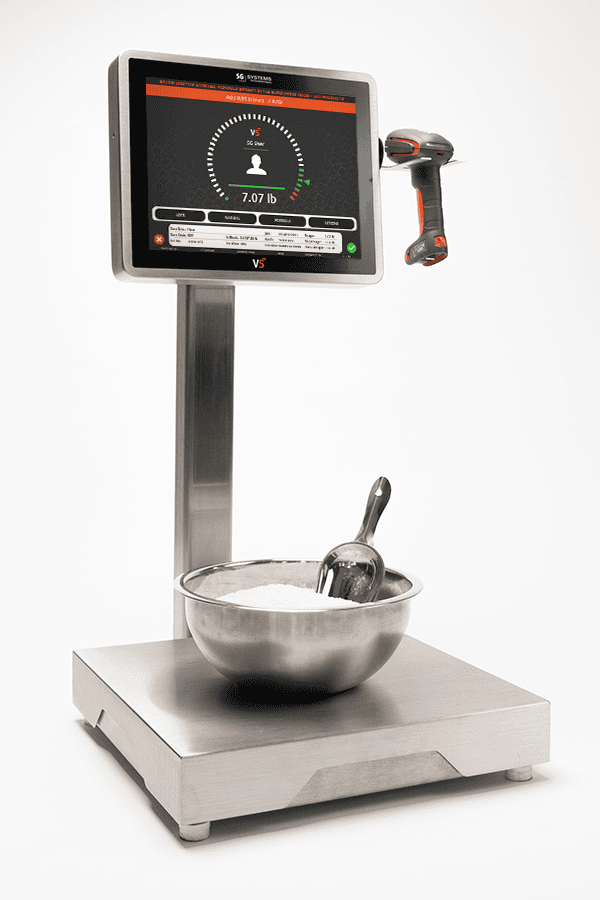
6) Receiving & directed put-away—controlling inventory from the dock
Good Inventory Control Software starts the moment product arrives:
- Goods receipt. Receipts against POs or inbound orders; capture of lot, quantity, catch-weight, COA presence and temperature-at-receipt.
- Initial status. New lots default to quarantine or restricted until QA or LIMS release is recorded.
- Directed put-away. Directed Put-Away suggests bins based on zone, FEFO, capacity and consolidation rules; operators scan bin barcodes to confirm.
- Cross-docking. For short-shelf-life product, inventory can move directly from receiving to outbound dock with lot and temperature controls intact.
7) Moves, picking & replenishment—scan-based control, not memory
Inventory Control Software replaces “tribal knowledge” with rules:
- Directed picking. Directed Picking guides operators to the correct bin and lot for production and orders, applying FEFO/FIFO rules and respecting status.
- Scan-confirmed moves. All movements (bin-to-bin, zone changes, re-stacks) are captured via scanner or terminal to preserve batch-to-bin traceability.
- Replenishment pathing. Replenishment Pathing defines where replenishment stock should be drawn from and to, not left to guesswork.
- Zone protections. Moves that would break zoning rules are prevented or forced into an exception workflow.
8) Catch-weight & units—recording reality, not nominal weights
For meat, cheese, produce and some industrial products, catch-weight is reality:
- Catch-weight registration. Catch-weighing is captured per case or pallet; Inventory Control Software tracks both “count” and “actual weight.”
- UoM conversions. UoM conversion consistency ensures that planning in kg, picking in cases and costing in lb all reconcile.
- Label printing. Labels pull actual net weight and UoM from the system; no manual edits at the printer.
9) Cycle counting & stocktakes—proving inventory accuracy
Inventory Control Software underpins inventory accuracy by:
- Defining counting policies. ABC classification, critical item lists, high-risk zones and post-event counts (after large moves or system outages).
- Generating tasks. Cycle count tasks for specific bins/items are assigned to users and tracked to completion.
- Variance handling. Discrepancies between system and counted stock are analysed, approved and adjusted with audit trails and reason codes.
Over time, variance patterns highlight process issues (e.g., unlogged scrap, mis-picks, incorrect UoM) that can be fixed at the root.
10) Data integrity & audit—who changed what, when, and why
Because Inventory Control Software controls both value and compliance:
- Unique user IDs & roles. Actions such as adjustments, override picks, status changes and location reassignments are limited to authorised roles.
- Audit trails. Every change to lots, bins, quantities and statuses is recorded in audit trails with user, timestamp and reason.
- Time synchronisation. Times are aligned across WMS, MES, LIMS and ERP to maintain coherent event sequences.
- Retention. Movement history is kept long enough to support traceability, recalls, investigations and audits per retention policies.
11) Implementation playbook—turning warehouses into controlled inventory
- Map your current reality. Document item master quality, location model, typical flows and where inventory data is actually kept (systems, spreadsheets, people).
- Stabilise item and lot masters. Clean up items, UoMs, allergen tags, shelf-life rules and lot-numbering schemes.
- Design the location and zone structure. Define zones, bins and constraints; make it match physical reality but enforce desired behaviour.
- Enforce scanning at key points. Receiving, put-away, moves and picks must be scan-based; manual operations become exceptions.
- Integrate with MES/ERP/LIMS. Ensure production consumption, receipts, QA release and shipments all touch the same inventory truth.
12) How people search for this (and what we cover)
Teams typically look for inventory control software, lot-based inventory system, FEFO inventory, bin location software, GMP warehouse system, inventory accuracy tools, WMS for food, or lot traceability inventory. This page explains how Inventory Control Software addresses those needs across multiple industries while supporting traceability and compliance.
13) How this maps to V5 by SG Systems Global
V5 Inventory Control is delivered primarily through V5 WMS and its integrations:
- With V5 WMS. V5 manages items, lots, bins, FEFO rules, directed put-away, directed picking, batch-to-bin mapping, cycle counting and returns for raw materials, WIP and finished goods.
- With V5 MES. V5 MES posts consumption and production back into inventory in real time, keeping execution and inventory views aligned.
- With V5 QMS & LIMS. V5 QMS and LIMS integration handle QA holds, releases and rejections, changing lot status in inventory automatically.
- With V5 Connect API. The V5 Connect API synchronises inventory positions with ERP, TMS and other external systems so everyone shares the same truth.
See the bigger picture in the V5 solution overview.
14) KPIs that show Inventory Control Software is working
- Inventory accuracy: system vs physical counts by item, lot and bin (% within tolerance).
- Cycle count completion: % of scheduled cycle counts completed on time, and variance rates.
- FEFO/FIFO compliance: % of picks that follow defined rotation rules.
- Hold/release discipline: number of incidents where quarantined or rejected stock was picked (target: zero).
- Traceability response time: time to answer “where is this lot now?” or “what lots are in this bin?” from the system.
- Write-off and adjustment trends: value and frequency of manual adjustments, scrap and unexplained loss.
15) Common pitfalls
- Relying on ERP alone for inventory control. ERP is not designed for bin-level, scan-based control; using it as such leads to workarounds and gaps.
- Letting operators bypass scanning. “We were in a hurry” is how location and lot errors enter the system.
- Weak location design. Overly coarse or unrealistic bin models make it impossible to enforce zoning and FEFO.
- Shadow systems. Excel “stock lists” and whiteboards become the real inventory; the system lags reality.
- No link to quality. QA status lives in a separate system, so inventory doesn’t know what is truly usable vs held.
16) Quick-start checklist
- Clean up item masters, UoMs, allergens and shelf-life data.
- Define a realistic, enforceable location and zone model for your main warehouse and coolers.
- Introduce scan-based receiving, put-away and picking on one pilot product family.
- Integrate lot status with QA/LIMS so holds and releases are reflected automatically.
- Run a mock recall using only system data to confirm you can find affected lots and their positions quickly.
17) Extended FAQ
Q1. How is Inventory Control Software different from ERP?
ERP holds financial and planning views of inventory (on-hand by item and site). Inventory Control Software operates at bin and lot level with real-time, scan-based movements, zoning and status control. ERP tells you what should be there; Inventory Control Software tells you what is there and what you can legally do with it.
Q2. Is Inventory Control Software the same as WMS?
In many environments, yes—Inventory Control Software is delivered as a Warehouse Management System (WMS) or a tightly integrated module. The emphasis here is on its role in lot control, traceability and GMP/GFSI compliance, not just logistics.
Q3. Do small sites really need dedicated Inventory Control Software?
Paper and spreadsheets can work for very small, low-risk operations, but as soon as you handle regulated products, allergens, short shelf-life or multiple customers with strict codes of practice, dedicated inventory control becomes essential.
Q4. How does Inventory Control Software help with traceability?
By recording every lot’s position, moves, status changes and picks, it allows you to trace upstream (where did this lot come from?) and downstream (where did we send it?) quickly and accurately, especially when integrated with MES and shipping systems.
Q5. Can Inventory Control Software manage work-in-process (WIP)?
Yes. Intermediate lots, staging areas and line-side buffers can all be modelled as locations, giving visibility into WIP and reducing “mystery scrap.”
Q6. What is the minimum viable Inventory Control Software setup?
At minimum: controlled items and UoMs, bin/location model, lot and status tracking, scan-based receiving and picking, basic cycle counting and integration with ERP and QA status.
Q7. How should we measure success after implementing Inventory Control Software?
Look for improved inventory accuracy, reduced stock-outs and overages, fewer traceability gaps in mock recalls, fewer QA findings related to status/segregation, and a downward trend in adjustments and unexplained loss.
Related Reading
• Inventory & Locations: Inventory Accuracy | Cycle Counting | Warehouse Locations & Zones | Batch-to-Bin Traceability
• Traceability & Status: Lot Traceability | Hold/Release | Mock Recall Performance
• Systems: WMS | MES | LIMS
• V5 Products: V5 Solution Overview | V5 WMS | V5 MES | V5 QMS | V5 Connect API
OUR SOLUTIONS
Three Systems. One Seamless Experience.
Explore how V5 MES, QMS, and WMS work together to digitize production, automate compliance, and track inventory — all without the paperwork.

Manufacturing Execution (MES)
Control every batch, every step.
Direct every batch, blend, and product with live workflows, spec enforcement, deviation tracking, and batch review—no clipboards needed.
- Faster batch cycles
- Error-proof production
- Full electronic traceability

Quality Management (QMS)
Enforce quality, not paperwork.
Capture every SOP, check, and audit with real-time compliance, deviation control, CAPA workflows, and digital signatures—no binders needed.
- 100% paperless compliance
- Instant deviation alerts
- Audit-ready, always

Warehouse Management (WMS)
Inventory you can trust.
Track every bag, batch, and pallet with live inventory, allergen segregation, expiry control, and automated labeling.
- Full lot and expiry traceability
- FEFO/FIFO enforced
- Real-time stock accuracy
You're in great company

















How can we help you today?
We’re ready when you are.
Choose your path below — whether you're looking for a free trial, a live demo, or a customized setup, our team will guide you through every step.
Let’s get started — fill out the quick form below.