

Quickbooks Inventory Control
QuickBooks Inventory Control — Using V5 to Run the Factory While QuickBooks Handles the Books
This topic is part of the SG Systems Global regulatory & operations glossary.
Updated November 2025 • QuickBooks inventory control, QuickBooks manufacturing inventory, V5 + QuickBooks integration, perpetual inventory, lot-based WMS, MES-driven production execution • Food, Sausage & Meat, Bakery, Dietary Supplements, Pharma, Cosmetics, Agricultural Chemicals, Ingredients & Dry Mixes, Consumer Products
QuickBooks Inventory Control on its own is designed for finance and small-business stock tracking, not for running a regulated or lot-based factory. It can track items, costs, purchase orders (POs) and sales orders (SOs), but it cannot see bins in your warehouse, orchestrate MES execution, enforce FEFO or allergen zoning, or generate audit-ready batch records. That’s where V5 Traceability comes in.
In a V5 + QuickBooks environment, QuickBooks stays your system of record for POs, SOs and the general ledger, while V5 takes over everything that happens inside the factory: receiving, bin-level inventory, lot status, production execution, consumption, yields, rework and shipping. V5 pulls POs and SOs from QuickBooks, runs the plant with its WMS and MES, then pushes summarised, accurate inventory and cost movements back to QuickBooks to maintain a perpetual inventory and clean financials.
“QuickBooks is excellent for invoices, payments and the P&L. V5 is where you prove which lot, which bin, which batch, which label and which customer. Together, you get real-time inventory with real-world evidence.”
TL;DR: Use QuickBooks for finance, customers, suppliers, POs and SOs. Use V5 to:
- Import POs and SOs from QuickBooks via the V5 Connect API.
- Receive, label and store inventory with lot, bin and status control in V5 WMS.
- Run production with V5 MES, capturing real consumption, yields and batch records.
- Ship against QuickBooks sales orders with directed picking, FEFO and lot traceability.
- Post consolidated inventory and COGS movements back to QuickBooks so the ledger stays accurate without turning QuickBooks into a shop-floor system.
1) Why pair QuickBooks with V5—hard truths
- QuickBooks doesn’t know your bins or lots. Native QuickBooks inventory is mostly “item quantity on hand by site.” It doesn’t know which pallet in which cooler, which lot, which status or which expiry date you actually have.
- QuickBooks can’t direct your warehouse or weigh room. It doesn’t do directed picking, batch weighing, allergen control or shop-floor scanning.
- QuickBooks is not a QMS. It has no concept of quarantine vs released lots, QA holds, micro results, rejections or rework status.
- Trying to run the factory from QuickBooks creates workarounds. Spreadsheets, manual adjustments and “off-book” inventory quickly appear—and quickly become the real system of record.
- ERP swaps are expensive. Many manufacturers outgrow QuickBooks on the shop floor long before they outgrow it financially. V5 lets you keep QuickBooks, while giving you real manufacturing-grade inventory control and execution.
2) Scope—what QuickBooks does vs what V5 adds
| Layer | QuickBooks role | V5 role |
|---|---|---|
| Customers & Suppliers | Customer and vendor master, terms, credit, invoicing | Reference customer/vendor IDs for labels, loads and reports |
| Purchase Orders | Create POs, send to suppliers, track receipts financially | Import POs; drive Goods Receipt, labelling and bin put-away in V5 WMS |
| Sales Orders | Enter SOs, pricing, taxes, invoices, AR | Import SOs; drive directed picking, packing and despatch in V5 WMS |
| Items & Inventory | Item list, on-hand per site, valuation, COGS | Lot-level, bin-level, FEFO, catch-weight and status control; Batch-to-Bin |
| Manufacturing | Simple builds/assemblies, item adjustments | Full MES: orders, batching, line clearance, IPC, batch records |
| Quality & Compliance | N/A – requires external systems | QA holds, release, deviations, CAPA, micro/stability, lab links via V5 QMS and LIMS integration |
| Traceability | Item-level history only (if used carefully) | Lot-level genealogy, one-up/one-down, mock recalls, mass balance |
| Integration | Accounting APIs and imports | QuickBooks connector + V5 Connect API for bi-directional data flows |
3) From QuickBooks PO to V5 Goods Receipt and inventory control
With QuickBooks + V5, the PO lifecycle looks like this:
- 1) PO created in QuickBooks. Purchasing creates and approves POs in QuickBooks as usual (items, quantities, prices, suppliers).
- 2) V5 imports open POs. Through the integration, V5 Connect API pulls open POs into V5, mapping QuickBooks item IDs to V5 item/lot structures.
- 3) Receiving in V5 WMS. When trucks arrive, warehouse staff receive against those POs in V5 WMS, capturing:
- Supplier lot, internal lot, expiry or best-before.
- Quantities and, if relevant, catch-weights.
- Initial QA status (quarantine vs released).
- Temperature or other receipt conditions if applicable.
- 4) Directed put-away & bin control. V5 assigns bins according to location topology, zoning and FEFO rules; operators scan to confirm bin and lot.
- 5) Summary posting back to QuickBooks. V5 posts the received quantities back to QuickBooks (per item) so the financial side and stock valuations are updated without losing lot-level detail inside V5.
4) From QuickBooks sales order to V5 picking, packing & shipping
Sales flow works the same way in reverse:
- 1) SO created in QuickBooks. Sales orders, pricing and customers are managed in QuickBooks.
- 2) V5 imports open SOs. V5 pulls open sales orders and line items, exposing them in WMS as pick tasks.
- 3) Directed picking in V5. Directed Picking chooses lots and bins based on FEFO, status and zoning, then pushes tasks to scanners or terminals.
- 4) Packing & labelling. Cases and pallets are packed, labelled and staged in V5; actual shipped quantities are recorded, including catch-weight if applicable.
- 5) Shipment posting back to QuickBooks. V5 passes shipped quantities back to QuickBooks, so invoices and COGS reflect what actually left the door, not just what should have.
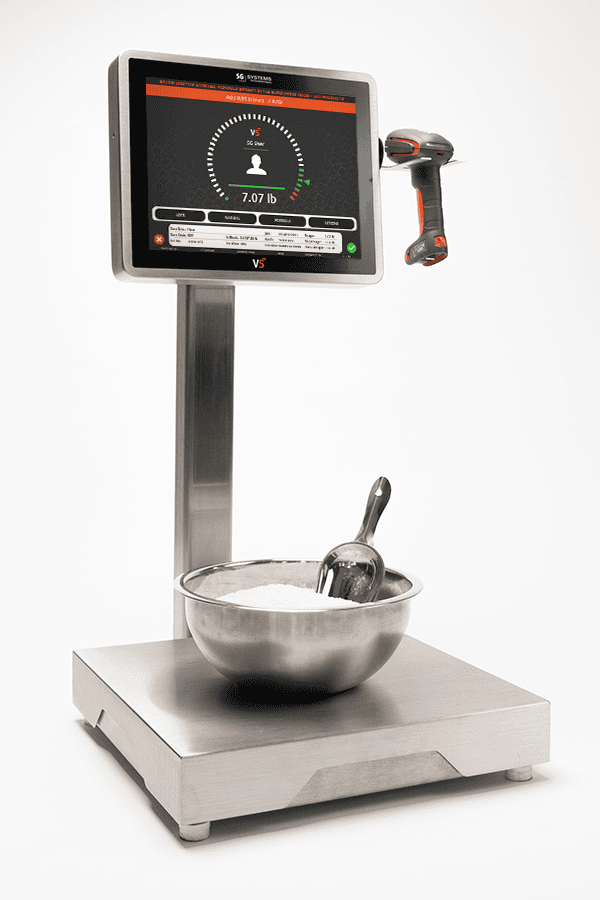
5) V5 as the perpetual inventory and production engine beneath QuickBooks
Once inventory is inside the plant, QuickBooks steps back and V5 takes over:
- Shop-floor inventory. V5 tracks raw materials, WIP and finished goods at bin, lot and sometimes sub-lot (tote, tub, cart) level, using batch-to-bin traceability.
- Production orders. QuickBooks works with basic builds/assemblies; V5 handles full work order execution, including changeovers, allergen control, batch sizing and rework flows.
- Consumption and yields. V5 MES records real consumption via weigh & dispense, batching systems, line-side scanning and automatic counters, generating accurate usage and yield data.
- Perpetual inventory inside V5. The V5 database always knows how much of each lot is in each bin, on each line or in each cooler, in real time. This is the true perpetual inventory—not the “estimated on hand” figure in QuickBooks.
- Periodic synchronisation back to QuickBooks. At a defined frequency (e.g., hourly, daily), V5 sends aggregated item-level movements (receipts, consumption, production, shipments, adjustments) back to QuickBooks so financial inventory and COGS are always aligned with shop-floor reality.
6) Compliance, quality & traceability—beyond what QuickBooks can see
QuickBooks has no native concept of GMP, GFSI or traceability. V5 adds:
- Lot status and QA control. Lots can be quarantined, released, rejected or blocked based on QA decisions stored in V5 QMS and lab results from LIMS; V5 WMS and MES enforce those statuses at picking and consumption.
- Batch records and execution evidence. Batch records/eBMRs in V5 show materials, steps, deviations and approvals; QuickBooks only sees summary builds and item movements.
- Lot genealogy and mock recalls. V5 maintains end-to-end lot genealogy across batches, warehouses and shipments; recall drills and customer-specific responses can be run from V5 data.
- Allergen and zoning rules. Zoning, sequence and changeover policies in V5 help meet BRCGS/SQF and retailer programs in ways QuickBooks cannot.
7) Integration patterns—QuickBooks inventory control with V5
Common patterns for QuickBooks + V5 integration:
- Item and customer/vendor sync. Item, customer and vendor masters are maintained in QuickBooks and synchronised into V5 as the reference catalog.
- PO/SO import. V5 regularly imports open POs and SOs, turning them into inbound and outbound tasks.
- Inventory and COGS export. V5 exports aggregate item-level movements back to QuickBooks as item receipts, build assemblies, inventory adjustments or journal entries, depending on design.
- Optional cost detail. If you need richer costing, V5 can provide additional analytics, but QuickBooks remains the legal financial ledger.
8) Examples of QuickBooks + V5 inventory control in different industries
- Meat & sausage processors. QuickBooks holds POs and SOs; V5 handles GS1-128 intake, catch-weight traceability, batching, smokehouse loads, finished chub and case labels; shipments roll back as item-level reductions in QuickBooks.
- Supplement manufacturer on QuickBooks. QuickBooks tracks customers and financials; V5 manages weigh & dispense, batch records, potency adjustments, allergen control and FEFO for finished bottles.
- Bakery using QuickBooks. V5 keeps flour silos, preferments, dough batches, racks and trolleys straight while QuickBooks retains site-level inventory and cost; sales orders drive route picking from V5.
- Cosmetics brand on QuickBooks Online. V5 tracks INCI-based raw materials, bulk batches, fill-finish, CPSR/PIF links and lot-labelled finished goods; QuickBooks handles B2C/B2B invoicing and financial inventory.
9) KPIs that show QuickBooks + V5 inventory control is working
- ERP vs V5 alignment: variance between QuickBooks on-hand and V5 stock by item should be minimal and explainable.
- Inventory accuracy: physical counts vs V5 bin/lot quantities (% accuracy), with QuickBooks mirroring V5.
- PO/SO integration health: % of POs and SOs imported successfully into V5 without manual correction.
- Recall response time: time to identify all affected lots and customers using V5, and confirm quantities in QuickBooks for financial/reserve entries.
- Adjustment and write-off trends: reducing manual adjustments in QuickBooks as V5 becomes the operational inventory source.
10) Common pitfalls when combining QuickBooks with inventory control in V5
- Letting QuickBooks and V5 diverge. If manual edits happen in QuickBooks that are not reflected in V5, reconciliation becomes painful. Agree that V5 owns operational inventory; QuickBooks mirrors it.
- Ignoring item master alignment. Inconsistent item codes, UoMs and descriptions between QuickBooks and V5 create endless mapping errors.
- Partial use of V5. Using V5 only for production but not for receiving or shipping leaves gaps in genealogy and inventory truth.
- Not involving finance early. Finance must understand how V5 movements map to QuickBooks transactions and COGS, or they will resist trusting V5 data.
11) Quick-start checklist for QuickBooks inventory control with V5
- Align item, customer and vendor masters between QuickBooks and V5.
- Set up a pilot integration: import POs and SOs for one product family into V5.
- Use V5 WMS for receiving, bin control and picking on that family; keep QuickBooks as-is for finance.
- Configure periodic inventory movement exports from V5 back to QuickBooks; validate results with finance.
- Run a mock recall and an inventory reconciliation using V5 as the operational truth and QuickBooks as the financial mirror.
12) Extended FAQ — QuickBooks Inventory Control with V5
Q1. Why not just upgrade to a big ERP instead of adding V5 to QuickBooks?
Full ERP replacements are expensive, risky and time-consuming. If QuickBooks is working for finance, adding V5 gives you manufacturing-grade inventory, traceability and execution without losing the simplicity your finance team likes.
Q2. Does V5 replace QuickBooks?
No. QuickBooks remains the system of record for the general ledger, POs, SOs and financial inventory. V5 becomes the system of record for lot-level, bin-level inventory and production execution, feeding clean, summarised movements into QuickBooks.
Q3. Can V5 update QuickBooks inventory in real time?
Yes. Many customers configure near-real-time or scheduled updates where V5 pushes inventory changes back to QuickBooks at regular intervals. The exact pattern depends on transaction volume and accounting policies.
Q4. How hard is it to integrate QuickBooks and V5?
Using the V5 Connect API and QuickBooks APIs/connector tools, integration typically covers items, customers/vendors, POs, SOs and inventory movements. The main work is in mapping and agreeing business rules, not technology.
Q5. Will warehouse staff use QuickBooks directly?
Ideally, no. They work entirely in V5 (scanners, terminals, dashboards). QuickBooks is for finance, customer service and management views, not for scanning pallets or running batch rooms.
Q6. What if a power user keeps adjusting inventory in QuickBooks?
Part of the project is governance: make V5 the operational truth and restrict manual inventory changes in QuickBooks. If adjustments are needed, they should originate from reconciled V5 data.
Q7. Can V5 support multiple QuickBooks companies or files?
Yes, with careful configuration. V5 can be the multi-site, multi-plant backbone while connecting to one or more QuickBooks company files, depending on your corporate structure.
Q8. What is the minimum viable QuickBooks + V5 setup for inventory control?
At minimum: synchronised items, POs and SOs; V5 receiving and shipping; lot and bin control in V5; and periodic item-level inventory updates from V5 back to QuickBooks. Production execution, batch records and QA can then be layered on as the next step.
Related Reading
• Inventory & Execution: Warehouse Management System (WMS) | MES | Lot Traceability | Batch-to-Bin Traceability
• Inventory Control: Inventory Accuracy | FEFO | Cycle Counting
• V5 Platform: V5 Solution Overview | V5 WMS | V5 MES | V5 QMS | V5 Connect API
OUR SOLUTIONS
Three Systems. One Seamless Experience.
Explore how V5 MES, QMS, and WMS work together to digitize production, automate compliance, and track inventory — all without the paperwork.

Manufacturing Execution (MES)
Control every batch, every step.
Direct every batch, blend, and product with live workflows, spec enforcement, deviation tracking, and batch review—no clipboards needed.
- Faster batch cycles
- Error-proof production
- Full electronic traceability

Quality Management (QMS)
Enforce quality, not paperwork.
Capture every SOP, check, and audit with real-time compliance, deviation control, CAPA workflows, and digital signatures—no binders needed.
- 100% paperless compliance
- Instant deviation alerts
- Audit-ready, always

Warehouse Management (WMS)
Inventory you can trust.
Track every bag, batch, and pallet with live inventory, allergen segregation, expiry control, and automated labeling.
- Full lot and expiry traceability
- FEFO/FIFO enforced
- Real-time stock accuracy
You're in great company

















How can we help you today?
We’re ready when you are.
Choose your path below — whether you're looking for a free trial, a live demo, or a customized setup, our team will guide you through every step.
Let’s get started — fill out the quick form below.